Master

I came across the following quote at a Meetup on Leadership:

“When the Master governs, the people
are hardly aware that he exists.
Next best is a leader who is loved.
Next, one who is feared.
The worst is one who is despised.

If you don’t trust people,
you make them untrustworthy.

The Master doesn’t talk, he acts.
When his work is done,
the people say, “Amazing:
we did it, all by ourselves!”

– Lao Tzu

I believe the above aptly describes the Master in ScrumMaster.

Fixing Bugs

Bug

Bugs, flies, mosquitoes are common in most countries. And some of these bugs are found even in our code!!!

Even though we try our best to prevent bugs, sometimes these bastards make their way in the cool software we produce.

So, when do we fix them?

It all comes down to one golden word. No, that word isn’t “now”. It’s Priority.

This Product Backlog is always arranged by priority – highest priority stories at the top and lowest at the bottom.

You work in Sprints while picking up new stories from the top of the Product Backlog. This would also include bugs if they are high priority ones.

So in a typical Sprint Planning, you would pick some items from the top (they could be a mix of stories and bugs), estimate them, and then go about working on them during the Sprint.

But what about the bugs that are discovered during a Sprint?

Guess what, the answer is Priority!

Let’s say you are in the middle of a Sprint with 2 days left, you have completed 3 stories and are left with 1 story. Suddenly the QA angel comes to you with 3 bugs.

But what to do? You don’t have enough time to work on the pending stories AND the bugs. So you seek PO’s/PM’s help in prioritising.

Maybe the bugs are critical. If you don’t fix them, then the stories they pertain to are useless. In this case, it might make sense to work on the bugs instead of the stories.

Maybe the bugs are not so serious and can be attended to later. Maybe you can send them to the client as “known issues”. In this case, you put them on the Product Backlog where they get prioritised for the next Sprint (or even later).

Or maybe, if time permits, you work on one of the 3 bugs raised that was critical but wouldn’t take time. That ways you can complete the remaining stories and fix the bug. But if it isn’t so, then you prioritise.

When in doubt, talk to your PO/PM for priority. They would help you decide which is more important – the bug fix or new functionality.

That Nasty Word Called Backlog

Backlog

Before Agile, I always considered the word Backlog to have a negative connotation. It always signified that I was lazy and that I had work pending. It always hinted at my inefficiency. Google’s synonyms for backlog (logjam, pileup) aren’t very promising either.

However, Agile rescued me from the dark side (ok, maybe I am exaggerating but you get the idea). In Agile, backlog is not a nasty word. It actually signifies that you have a roadmap of what shape your project is going to take in the future. A backlog is a repository, in fact, a nursery of future features where they evolve over time. It is a hopper that contains user stories that would form the product in the future.

Every feature that you would like to have in your project is present in the backlog in the form of a user story (or maybe an epic). A backlog, ideally, should be DEEP (credit for this acronym goes to Roman Pichler, author of Agile Product Management with Scrum): Detailed appropriately, Estimated, Emergent, and Prioritised. Let’s see what each of these fancy words means.

  • Detailed Appropriately: High priority backlog items (at the top of the backlog) are defined in detail and are ready to be discussed in the next iteration. Lower priority backlog items (towards the bottom) are more coarse grained. The items in the middle are, well, somewhere in the middle with respect to detail too.
  • Estimated: Each item in the backlog is detailed. Coarse grained items have coarse estimates while fine grained items have a relatively accurate estimate (if there is a term like that).
  • Emergent: The product backlog continues to evolve over time with items being added to it, removed from it, modified, split into smaller stories, and so on.
  • Prioritised: Each item in the backlog has its own priority vis-a-vis other items in the backlog. The priority of stories, like the stories themselves, can change. Overall, the items at the top of the backlog have a higher priority and the ones at the bottom have a lower priority.

In order to have a smooth Sprint (and Sprint Planning), a groomed backlog is imperative. Failure to groom the backlog can take the project on the wrong track and leave the developers confused.

If you are aware of the acronym GIGO (Garbage In, Garbage Out), you would know that wrong input can create wrong (sometimes, even worse) output. Same is true of backlog.

Do not fear having a backlog. Instead, fear having a backlog that doesn’t evolve, a backlog that doesn’t reflect the upcoming features, a backlog that doesn’t show you at a glance the higher priority vs lower priority features.

Capturing Sprint Planning Discussions

Meeting Notes A lot of discussion happens around user stories during Sprint Planning sessions. Sometimes there is a discrepancy between what gets discussed and what gets implemented during the Sprint. This is because something was discussed but not captured somewhere. We need to close this loop and make sure that that capturing happens. I am not talking about recording some fancy audio-video tool. I am referring to capturing this discussion in the user stories themselves.

As you already know, user stories are only reminders for conversations and not be-all / end-all. There are details that are left out of user stories in the favour of discussion. When that discussion happens, we need to make sure that the conclusion is captured in the user stories. It could result in updating of the acceptance criteria. Or if the discussion was around technical aspects that need to be handled in a certain manner, the developer creates technical tasks for himself under the same story.

The key point is that whatever was discussed and agreed upon gets captured. During the sprint, when you get to that story, you should be able to look at it and know for sure what needs to be done in order to be done with the story. This helps in doing a good QA and UAT as there is a firm reference to verify against.

User Story Estimations

Dilbert on Estimations

Many of us still grapple with user story estimations:

  • Should we estimate complexity (what if something is complex but doesn’t take too much time)
  • Should we estimate effort (what if something is straightforward and easy but takes a lot of time)

Going back to basics on estimations (seminal work by Mike Cohn), here are some points on how to estimate better. I have quoted Mike Cohn at some places(italicised) so that I don’t stuff it up:

1. What to Estimate

The number of story points associated with a story represents the overall size of the story. There is no set formula for defining the size of a story. Rather, a story point estimate is an amalgamation of the amount of effort involved in developing the feature, the complexity of developing it, the risk inherent in it, and so on. No matter how much effort you put into an estimate, an estimate is still an estimate. No amount of additional effort will make an estimate perfect.
The story is looked as a whole and not piecemeal (iOS, PHP, QA, etc.). When we say “developing”, we are referring to end-to-end development (QA included) and delivering it to the PO / client.

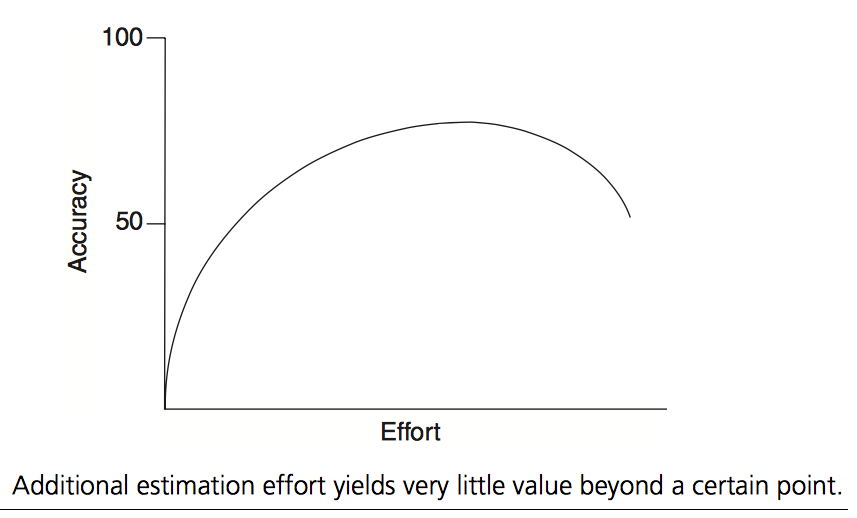
2. Effort-Accuracy Curve

Effort-Accuracy Curve

Till an extent, the estimate continues to improve as you put more effort in trying to be accurate. After sometime, the “law of diminishing returns” kicks in which means that the improvement in accuracy is less as compared to the amount of effort being put in. One should stop before this point is reached.

3. Estimates are Shared

Estimates are derived collaboratively by the team, not by a single person. Even though one might be tempted to go with the estimate of who would do the job, the team’s estimate is preferred. The people most competent in solving the task should estimate it.

4. Buckets of Water and Sand

Rather than thinking of work as water being poured into the buckets, think of the work as sand. If you are estimating using 1, 2, 3, 5, and 8 and have a story that you think is just the slightest bit bigger than the other five-point stories you’ve estimated, it would be OK to put it into the five-point bucket. A story you think is a 7, however, clearly would not fit in the five-point bucket.

5. The Right Amount of Discussion

Some amount of preliminary design discussion is necessary and appropriate when estimating. However, spending too much time on design discussions sends a team too far up the accuracy/effort curve of the graph. The question is this – would that extra discussion change the estimate a lot? Can we skip that and check the finer details with the PO during the Sprint?

We can start time-boxing our discussion. We start a timer (for say 2 minutes) and discuss. At the end of the time, we draw cards. If there is a lot of variation, we again start the timer to sort out the variation and then draw again. By this time, the estimates need to start converging or the outliers can consider compromising for team’s sake unless they have a strong point for not doing so.

Making the Most of Daily Scrums

Condescending Wonka

Yeah! That’s right. Doing Daily Scrums (aka daily stand ups) alone doesn’t make you Agile. You need to be doing them well too.

But nobody told you how to do them properly. Really? REALLY? Well, in that case show this post to your ScrumMaster.

Anyways, getting on with it. Here’s how you you can improve your Daily Scrums.

1. The Purpose

The purpose of Daily Scrums is to keep the team in the loop about your progress and bring to light your impediments so that the ScrumMaster / Team can remove them.

2. Some Prerequisites

  • Update your burndown chart on the wall BEFORE the daily scrum so that the team can look at it. The burndown chart shows how many points are remaining in the Sprint at the start of each day. You can update it at the end of the day (for the daily scrum next day) or the same day when you step into the office. But it should be updated before the team commences  the Daily Scrum.
  • Update the project details with the number of Sprints completed / remaining. For example, 3/9 says that you are in Sprint 3 of the project having a total of 9 Sprints. Update this at the start of each sprint.
  • Move your story card from To-Do to Doing column (for stories that are starting) and from Doing to Done column (for stories that have been completed)

3. What to say (and what not)

Each team members mentions the following:

  • What he did yesterday (the last working day in case yesterday was an off / leave).
  • What he is going to do today
  • Anything stopping him (any impediments in his way of delivering his sprint tasks as planned)
  • Whether he is on schedule to complete the Sprint deliverables, behind schedule, or ahead of schedule. Saying this is not the norm but this is very important for us. We want to hear this.

There’s a good chance that when a team member mentions something as part of his update, you might have something to add to it / respond to it. If it is a one-liner comment / answer, go ahead with it. If it becomes a back-and-forth discussion, then stop there and take it offline. Do not continue to discuss it during the Daily Scrum.

4. How long does it take

A Daily Scrum should not take more than 15 minutes. In fact, if you are doing Step 3 above well, 15 minutes would be more than sufficient for the whole team.

5. Pay attention to what the team says

Sometimes we do not pay attention to what the a fellow team member is saying because we are not working on the same story. This is not right. You are still a part of the same team. The whole point of having a team is to let the team members help each other out. Isn’t that how a team is defined as? Even if your fellow team member is working on a different task than you and he is facing some issue you can help with, volunteer to help him out. Your help would not be forgotten and when you get stuck in the future, your team members would help you out too.

Also, in case, a team member falls ill or has some emergency which causes him to be away from his project, you might be called in to help move that story along. If you pay attention during each Daily Scrum, you would not have much trouble when you are filling in for him.

So pay attention to who is saying what rather than having side conversations (which disturb others trying to listen to the speaker) or staying tuned out.

Plan BETTER, Not MORE

Plan

How many times has it happened that you had a perfect plan for a holiday or some event that you were organising and the plan fell flat owing to some scenario that you hadn’t anticipated? Well, we have all been there. German Field Marshall Helmuth von Moltke the Elder put this succintly – “No plan survives contact with the enemy”.

Perhaps you were able to recover in some of those snafus but, as would agree, it was because you improvised, you adapted to the situation, and reacted accordingly. Well, that is being Agile truly.

We have grown up thinking we need to plan for the future down to the smallest detail. But the reality is something entirely different. Yes, we need to plan. But not as much as we think and not as far in the future as we are led to believe. We need to plan better, not more.

This couldn’t be more true than software development. The Waterfall model of software development relied on heavy upfront planning that was documented even more heavily. Then the software teams were made to march a thin line that was their plan. But after all these years and a lot of frustrated clients and money poured down the drain, we have realised that Waterfall probably wasn’t the best way to go forward. This is why Agile software development model came into being. It includes various levels planning but each detailed appropriately and not focussed on having all details mentioned upfront.

You begin with a high level list of features duly prioritised (called the Product Backlog). Then a few items are picked from the top of the list (highest priority items) and details thrashed out. These detailed items (called User Stories) are estimated by the development team and then a few of them are selected to be completed within a short timebox (one to two weeks long) called the Sprint. The list of items to be worked within the Sprint is called the Sprint Backlog. During the Sprint, the team implements the features selected in the Sprint and at the end of the Sprint you have working software in accordance with your requirements. This process is performed iteratively over the product backlog and during the course of the development, you can release the working software to the market multiple times.

Effectively, we don’t plan the entire project in advance. We plan at a high level and then refine bits of the plan iteratively. This helps us incorporate ground realities in our plan as we go about refining it. Things change all the time and we make sure that we are in a position of reacting accordingly. Quoting the famous American General George S. Patton – “A good plan executed today is better than a perfect plan executed at some indefinite point in the future”.

The Power of Retrospective

Retrospective

They say hindsight is twenty-twenty. Things always seem to fall in place when looked back upon – the causes, the affects, the problems, the solutions, and more problems. The key is in learning from it and using that learning to guide our actions in the future. Agile has formalised this wisdom into a meeting called the Retrospective.

A Retrospective (called retro in short) in Agile terms is when you reflect back upon a certain period (say a Sprint or a Release) or the entire project (in case of project-end retrospectives) and see what went well, what could have gone better, and what experiments to try out in the next sprint / release / project. Some key questions could be:

  • What went right? What went wrong?
  • What could have been done better?
  • What challenged / excited you?
  • Any events / activities / tasks that you would want to highlight.
  • Your overall feeling about the sprint.

Each team member involved with the project (even the client if possible) sits in the retro. There are various ways of conducting a retro but the book Agile Retrospectives by Esther Derby and Diana Larsen offers a structured approach:

  • Set the Stage
  • Gather Data
  • Feelings
  • Generate Insights
  • Decide What to Do
  • Close the Retrospective

In a nutshell, the team highlights issues (both positive and negative) they want to raise. Then the related issues are grouped together and thrashed to arrive at the root cause. The objective is to look for causality so that negative issues could be avoided and positive ones reinforced in the future. It is possible that some of those negative issues were the direct result of individual actions. However, the team never falls into the trap of blame-game and no fingers get pointed at any individual. The principle behind this is the Prime Directive framed by Norman Kerth – “Regardless of what we discover, we understand and truly believe that everyone did the best job they could, given what they knew at the time, their skills and abilities, the resources available, and the situation at hand”.

A retro is a great platform to uncover those feelings / events that may be hampering the process. In Scrum, whilst the Sprint Review is an opportunity to implement the inspect-and-adapt philosophy to the product, the retro does so for the process. If a team continues to hold retros in spirit and word, it would identify actionable items at the end so that the process is improved and the impediments uncovered are removed or the experiments outlined are accomplished. It helps the team vent out feelings of frustration / sadness without making anyone look bad. It also lets the team highlight positive steps performed by individuals that helped the team. Most importantly, because Agile is a framework and allows you to tweak things without compromising on the principles, the team can identify some hypotheses it might want to test in the next Sprint / project. This helps the process to evolve and strengthens it further.

Seeing the power of retros and the value they bring to the table, a lot of teams have started using them. I have seen even support staff (HR / Admin) use retros to help them improve their effectiveness and chip out at their weaknesses.

Summarising the above, by holding regular retros, you can make identify areas of improvement that maybe plaguing your team performance or strengths which can be leveraged in doing a better job.

Are You There?

Are You There

At Appster, we practice Scrum as our software development methodology. The upside of this incremental and iterative philosophy is that we can deliver working software very frequently (every week) and yet be open to change during the course of the project. The downside is that it requires active involvement of the client. Clients who could sit back and relax after the heavy exercise of requirements gathering during Waterfall days find this challenging and, sometime, even revolting.

The team requires client presence (physical or over video conference) during Sprint Planning Meetings. This is the time when the team needs clarity from the client on the high priority user stories that can be picked from the top of the backlog as Sprint Backlog. The team might require client involvement during the course of the Sprint when it is faced with a priority decision (which stories to complete in the remaining time available) or maybe some clarification on an existing story or maybe a decision on the multiple options possible for implementation of a story. And finally the team requires the client to do User Acceptance Testing (UAT) of the build that the team generates at the end of the Sprint. This part is of key importance. UAT actually generates feedback for the team on how did it deliver against the requirements of the client. Even if it was spot on, the client might get “aha” moments during the UAT and might suggest changes (which are welcome in Agile) that would go on to improve the product.

While clients are available during Sprint Planning (actively or passively through a PO), it is hard to get them to do a thorough UAT. Maybe because they also have a day job or maybe because they are busy in other aspects of their business as an entrepreneur. Whatever the reason be, the lack of timely UAT hurts the project and demoralises the team. The team feels sad when it don’t get timely feedback as it feels that it is working on something not important enough for the project sponsor. It feels orphaned. The project suffers because the team might go off-course for lack of a corrective action that the UAT could have spawned.

As a result of delayed / improper feedback, client feedback accumulates towards the end of the project. At this point, two opposing forces come into action – the client who is giving feedback (which might have lost relevance due to lost time) and wants all his points to be considered; and the team which is wanting to wrap up the project and is inclined to ignore those points that the client is suggesting. This force completely dries up the agility that was intended into the project. The client is welcome to add more to the project provided he takes out an equivalent amount of work from the plan or allows more time to the project. The above scenario keeps the deadline but tries to add more work which might be relevant (for example bugs in the application discovered by the client).

For a successful project release and happy stakeholders (development team and the client), it is imperative that the client does timely UAT and provide feedback that can be fed back into the product backlog and the product can be developed with a sharp focus on the market. The team should not have the chance to ask the client, “Are you there?”.

Better Sprint Planning

Abraham Lincoln on Planning

A Sprint Planning meeting produces the following artefacts

  • A Sprint Goal which is a short description about what the Product Owner (PO) and the team have agreed to achieve in the Sprint.
  • A Sprint Backlog which is a set of prioritised and estimated user stories and their respective tasks that the team has committed to in order to achieve the Sprint Goal

The team needs to have full clarity on both the above artefacts in order to deliver working (shippable) software in accordance with their Definition of Done at the end of the Sprint. So that the Sprint is worth the while of the team and worth the money the client is spending for that Sprint, each member of the team needs to understand the Sprint’s stories and the tasks included therein well. This also includes the UI designs or wireframes for each story included in that Sprint. While the stories describe the functionality, the UI designs / wireframes describe the form.

Let’s look at the Steps of a Sprint Planning meeting:

1. Review the Product Backlog

The PO starts describing the stories from the top of the backlog along with their respective UI designs/wireframes. The team usually asks questions regarding the stories being discussed which the PO answers. Once the team has complete clarity on what needs to be done to complete the user story, the team creates a list of tasks (usually technical in nature) for each user story. The QA person (if you have a specific person for this role) also mentions some test cases he would use for black box testing. However, he is free to include them during the course of the Sprint too. What is relevant and what is not can always be discussed among the team and the PO.

2. Estimate the Sprint Backlog

When the team feels they have discussed enough stories from the top of the backlog, they start estimating the same. The preferred way is to estimate stories in Story Points and use Planning Poker so that everyone is on the same page and the estimate has acceptance within the team.

3. Commit

Based on the team’s current velocity and the time available within the Sprint, the team makes a commitment on what stories it would complete at the end of the Sprint as per the definition of done without skimping on quality.

Now let’s try and understand a Sprint Backlog in depth so that we know the expected output from a Sprint Planning meeting. A Sprint Backlog has the following attributes:

  • It is a subset of the Product Backlog
    • Whatever the PO/Client feels needs to be a part of the product forms the Product Backlog. The Sprint Backlog is a subset of it i.e., it cannot include anything that is not a part of the Product Backlog. Sometimes, there is a need for some technical housekeeping for which the team can request the PO to include (and prioritise) in the Product Backlog. They can be included in Sprint Backlog too provided they are a part of the Product Backlog first.
  • A Sprint Backlog requires a commitment from the team on what would be delivered at the end of the Sprint. This team commitment needs to:
    • be clearly understood and agreed upon by every single member of the team and the PO too
    • be achievable without sacrificing quality
    • be achievable without sacrificing sustainable pace (it is okay to stretch once in a while but not every time)

So now we know what is expected out of Sprint Planning and what are the steps thereof. Let’s now consider some salient points that contribute towards a fruitful Sprint Planning

  • Fixed Start and End Days

A Sprint needs to start and end on the same days (I am considering Sprints that are 1-week, 2-week, n-week long). So if your Sprint cycle is Monday to Friday, it should never change. This helps get into a periodic rhythm that is felt by the entire team. All Sprints are equal sized and this never changes. A Sprint is all inclusive. Apart from the project development, it also includes Sprint Planning at the start and Sprint Review and Retrospective at the end.

  • Include Everyone

A Sprint Planning includes everyone on the project – the PO (and the client too if possible), the Team (including the developers, QA persons, UI design persons), and ScrumMaster

  • Sync Sprint Plan With the Client

If the client is not present in the Sprint Planning meeting and the meeting is chaired by the PO, it is imperative that the PO syncs up with client to apprise him of what all has been committed to in the Sprint Planning. The client might have a rough idea initially as he had prioritised the backlog but this sync up would make sure he knows for sure what to expect at the end of the Sprint.

  • Include Spikes

As it happens on most complex projects, there are functionalities / technologies which no one in the team might have experience with. Such functionalities require researching and building a proof of concept perhaps. For such unknowns, it is good to include a small time box within the Sprint (one or two days for example) for researching and checking the viability. This is done a Sprint in advance. Such a spike reduces the uncertainty when the team comes across implementing the functionality actually and helps them estimate the story appropriately.

  • Abnormal Termination

There may be a rare case that the Sprint Goal that the team is chasing becomes irrelevant in the middle of the Sprint. In such a case, the Sprint can be terminated in the middle and then a new Sprint is planned. However such terminations should be exceptions, not rules. Whenever you have changes being requested to the current Sprint, they should be prioritised to be taken up in the next Sprint. Only in the extreme case should one consider terminating a Sprint in progress.

Now that we have a good hang of what a Sprint Planning (and Sprint) includes, let’s look at Five Commandments for Sprint Planning

1. Thou Shall Stay a Sprint Ahead of the Team

The PO should stay a Sprint ahead of the team grooming the backlog, making sure that the epics are broken down into user stories, arranging the UI designs / wireframes for the stories in the upcoming Sprint, and identifying stories that might need Spikes to be included in the current Sprint.

2. Thou Shalt Not Extend the Sprint

It’s possible that the team is left with an incomplete story at the end of the Sprint. They might consider extending the Sprint by a day or two to complete the pending work and fulfil the commitment they made at the start of the Sprint. This should never be done. Never, ever. Sprint delivery includes completed stories and incomplete / pending work gets put back on the backlog for prioritisation. The Sprint is never extended. This ties in with the point above of having Fixed Start and End Days.

3. Thou Shalt Not Include Extra Time

Never factor in extra time (apart from working hours) in a Sprint. PO / team might be tempted to consider after hours or weekends to meet an aggressive target or complete stories committed in a Sprint. This can be considered only in the rarest of rare cases and should never be encouraged. This ties in to the principle of sustainable pace within a Sprint. While it can be permitted for a couple of days in the project, any longer than that and the team would be setting itself up for failure and lower productivity.

4. Thou Shalt Not Add More Work

Adding more work in the middle of a Sprint is something that Agile is strongly against. The team commits to a set of stories according to their Definition of Done that makes their Sprint Backlog. That backlog should not be messed with. The PO should not try to add / change stuff that is already a part of the Sprint Backlog. Only if the team agrees can the PO swap some item in the backlog with another equally sized item provided it doesn’t derail the Sprint. Any changes can be considered in the next Sprint. But no work should be added to Sprint. However, if the team finishes early, they are allowed to pull in more stuff from the Product Backlog into their Sprint Backlog but not otherwise. Adding more work to a Sprint in target would amount to hitting a moving target and is a sure shot recipe for disaster.

5. Thou Shall Deliver After Each Sprint

The team should deliver working software as per the Sprint Backlog and the Definition of Done after each sprint. No exceptions. This should be delivered to the PO / client for User Acceptance Testing and any changes / feedback should be put back on the Product Backlog for prioritisation.

There is the concept of a Sprint 0 that is a double edged sword. It can have its benefits if handled properly else it can cause you to slide back into Waterfall. The purpose of a Sprint 0 is to:

  • bring the team together and give them a high level overview of the project
  • set up tools (code repository, project management, story board tool, etc.) for the project
  • check tech feasibility of risky components of the project
  • get UI design and wireframes done for the first Sprint
  • break down epics into user stories for Sprint 1
  • arrange resources like App Store developer account, servers for development / testing, emails for support, etc.

Sprint 0 should not be mistaken for a mini Waterfall wherein all stories are attempted to be defined in detail upfront, UI design completed upfront, etc. All these tasks happen Sprint by Sprint (being one Sprint ahead of the team). The focus should be on emergent design (both architecture design and UI design) during the course of the project and not everything upfront.

Though the above seems like a lot (and probably it is) but once you get into a rhythm of doing it, it becomes natural. It is similar to learning to drive a car wherein you have to do a lot at the same time – control the steering wheel, keep the foot on the accelerator, change gears occasionally while pressing the clutch, look in front, look in the rear view mirror, look in the side view mirror, be ready to hit the brakes! After some time it gets so smooth that you can do all the above (and more *wink*) with ease. Same is true with Sprint Planning. If you learn to do it well, the project execution would be very smooth.